

Group Module Architecture
Overview
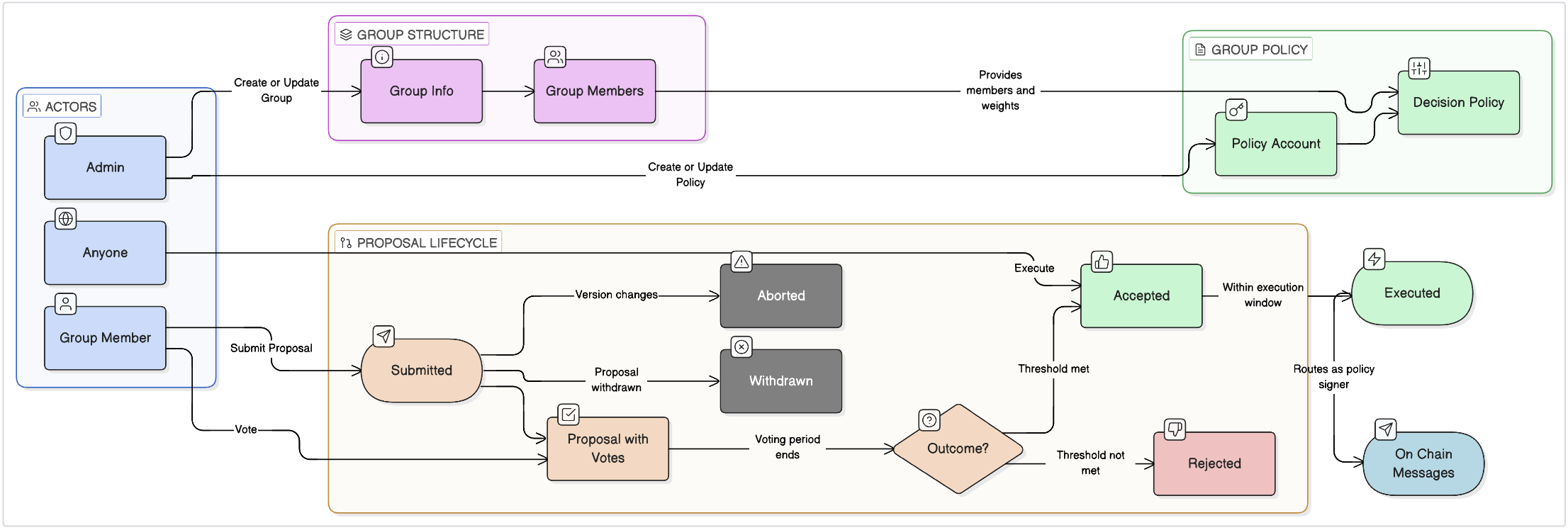
The Group module enables collective decision-making through a proposal-and-vote system. Groups are collections of accounts with associated voting weights. Each group can have one or more policy accounts, each with its own decision policy governing how proposals are accepted or rejected.Architecture Diagram
Core Concepts
Group
A group is an aggregation of accounts with associated voting weights. It is not itself an account and does not hold a balance. A group has an administrator who can add, remove, and update members. Key points:- The administrator does not need to be a member of the group
- A group policy account can itself be the administrator of a group, enabling self-governed groups
- Members have weights that determine their relative voting power within proposals
Group Policy
A group policy is an account associated with a group and a decision policy. Group policies are abstracted from groups so that a single group can have multiple decision policies for different types of actions. This separation keeps membership consistent across policies while allowing different authorization thresholds for different operations. The recommended pattern is:- Create a master group policy for a given group
- Create additional group policies with different decision policies for specific action types
- Delegate permissions from the master account to sub-accounts using the
x/authzmodule
Decision Policy
A decision policy is the mechanism by which group members vote on proposals and the rules that determine whether a proposal passes based on its tally outcome. All decision policies have:- Minimum Execution Period: The minimum time after submission before a proposal can be executed. Can be set to
0to allow immediate execution. - Maximum Voting Window: The maximum time after submission during which members can vote.
Threshold Decision Policy
A threshold decision policy defines a minimum total weight of yes votes required for a proposal to pass. Abstain and veto votes are treated as no votes.Percentage Decision Policy
A percentage decision policy defines acceptance as a minimum percentage of total group weight voting yes. This policy is better suited for groups with dynamic membership, since the percentage threshold remains meaningful as member weights change.Custom Decision Policies
Chain developers can implement custom decision policies by implementing theDecisionPolicy interface. This enables encoding arbitrary acceptance logic into a group policy.
Proposal
Any group member can submit a proposal to a group policy account. A proposal consists of:- A list of messages to execute if the proposal is accepted
- Optional metadata, title, and summary
- An optional
Execfield to attempt immediate execution on submission
Voting
Members vote with one of four options:VOTE_OPTION_YESVOTE_OPTION_NOVOTE_OPTION_ABSTAINVOTE_OPTION_NO_WITH_VETO
Tallying
Tallying occurs when either:- A
Msg/Exec,Msg/SubmitProposal(withTRY_EXEC), orMsg/Vote(withTRY_EXEC) triggers an execution attempt - The proposal’s voting period end is reached during
EndBlock
PROPOSAL_STATUS_ACCEPTED. Otherwise it is marked PROPOSAL_STATUS_REJECTED. No further voting is permitted after tallying.
Executing Proposals
Accepted proposals must be executed beforeMaxExecutionPeriod after the voting period ends. Any account (not just group members) can submit a Msg/Exec transaction to execute an accepted proposal.
When Exec is set to EXEC_TRY on a submit or vote message, the chain attempts immediate execution. If the proposal doesn’t yet pass, it remains open for further votes.
Withdrawn and Aborted Proposals
- Withdrawn: Any proposer or the group policy admin can withdraw a proposal before the voting period ends. Withdrawn proposals cannot be executed.
- Aborted: If the group or group policy is updated during the voting period, the proposal is automatically marked as
PROPOSAL_STATUS_ABORTEDsince the rules it was created under no longer apply.
Pruning
Proposals and votes are automatically pruned to prevent unbounded state growth. Votes are pruned:- After a successful tally triggered by
Msg/Execor a submit/vote withTRY_EXEC - On
EndBlockimmediately after the proposal’s voting period ends (including aborted and withdrawn proposals)
- On
EndBlockwhen a withdrawn or aborted proposal’s voting period ends - After a successful proposal execution
- On
EndBlockaftervoting_period_end + max_execution_periodhas passed